ESTS AI Description User Guide
Welcome to the another creation by ESTS in Shopify
App Name - AI Description Generator
This app is specially designed to generate a description of the product. This app is free and easy to use. The main purpose of this app is to generate a more attractive description of products than a custom one, so that a better description of the product will have a positive impact on the store's customers. So that the customer can easily understand the details of the product.
In the upcoming steps, you will come to know how to install this app and how to use this app.
- Section-1 Setup Instructions.
- Section 2 User Guide.
Section-1 Setup Instructions.
Let's get started by following this guide.
1. Install through the Shopify App Store
Steps:
- Log in to the Shopify App Store.
- Find the AI Description Generator app to install, and then click it.
- On the app listing page, click Add app.
- In your Shopify admin, to authorise the use of the app, click Install app.
2. After the app is installed, you can view and use it from the Apps page in your Shopify admin.
Open the app in Shopify.
- Click on the app AI Description Generator from the App section to open. It will look like this.

You have successfully completed the app Installation and setup process.
3. Section 2 User Guide.
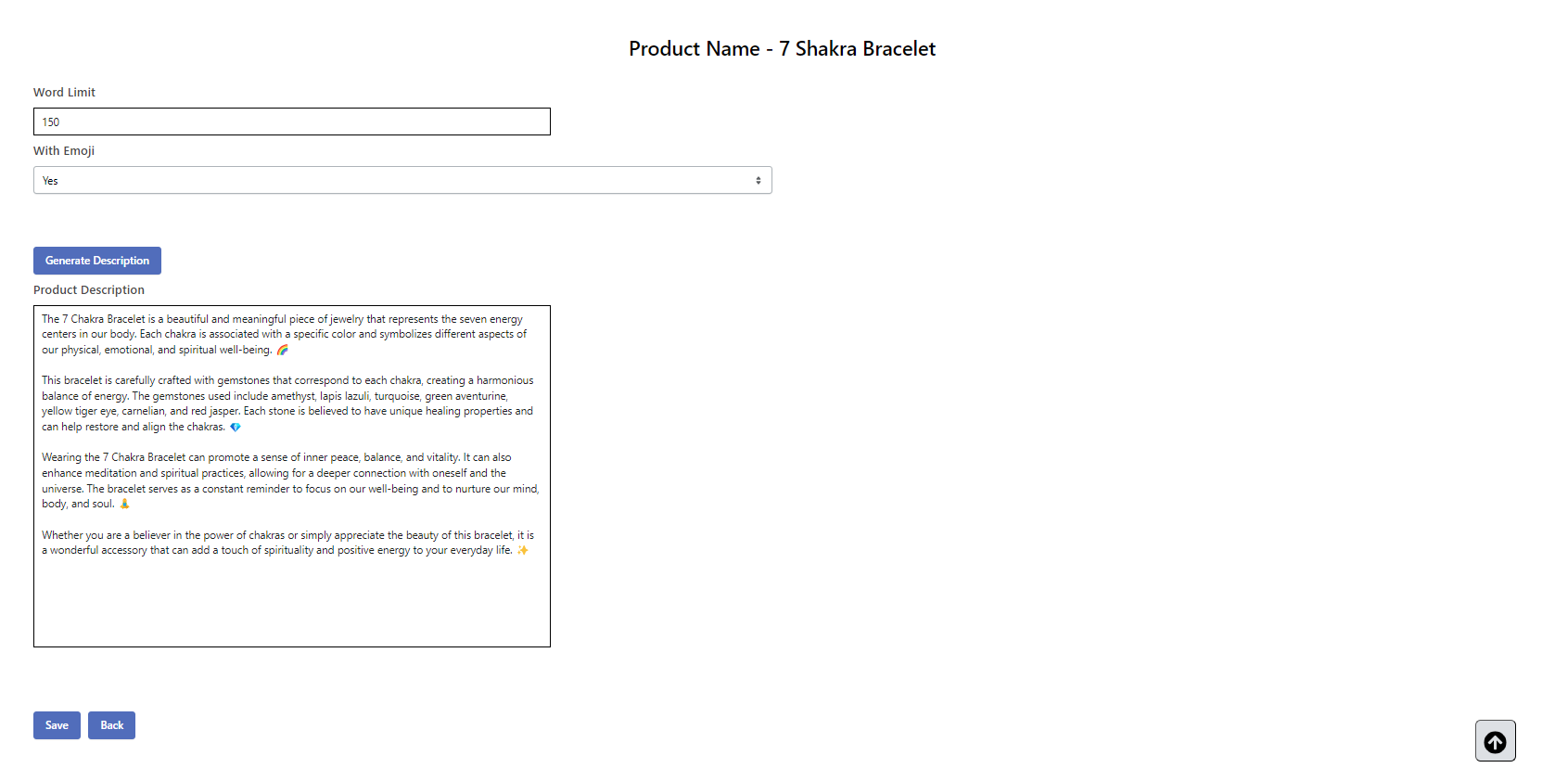
First of all, when you open the app AI Description Generator, it will show you a list of products in your store. This app is quite simple to use. You just need to click on the name of the product whose description you want to generate.As soon as you click on the product name, you will see a screen like the screenshot shown below.

Here are some extra features that are available before generating the description of the product. The use of this option is optional. You can also skip this option.
- The first option is " Word Limit " by default it will generate the description of product upto 75 words, if you want to increase or decrease the number of words then you can do it form here. For example if you want to generate the description of products upot 150 words then you can set here " 150 ".
- Another Option is " With Emoji " if you wish to add emoji in the description of your product then you can set it to Yes . By default it has been set to No
After that, click on the button Generate Description. As you click on this button, it will take a few seconds to generate the description based on your selection. And then your description will be ready.
As your product's description is ready, it will be shown in the product description box. Here you can make any changes if you wish to. Then click on the Save button.As you click on Save, your generated description will be saved in the description section of the product.
First of all, when you open the app AI Description Generator, it will show you a list of products in your store. This app is quite simple to use. You just need to click on the name of the product whose description you want to generate.
As soon as you click on the product name, you will see a screen like the screenshot shown below.
- The first option is " Word Limit " by default it will generate the description of product upto 75 words, if you want to increase or decrease the number of words then you can do it form here. For example if you want to generate the description of products upot 150 words then you can set here " 150 ".
- Another Option is " With Emoji " if you wish to add emoji in the description of your product then you can set it to Yes . By default it has been set to No
You can repeat this process as you need.
Congratulations ! you have setup all things. You are now ready to use this app.
For any queries, please submit a ticket: Submit a Ticket
Related Articles
ProfitSpy AI User Guide
Welcome to another creation by ESTS in Shopify App name – ProfitSpy AI 🔰 Introduction ProfitSpy AI helps you track competitors, automate adjustments, and monitor market activity. With AI-powered insights and smart rules, you can manage your products ...ESTS - RMA Call Desk User Guide
Welcome to the another creation by ESTS in Shopify App Name - ESTS - RMA Call Desk This app is created by ESTS (Expound Soft Tech Solution). This app is especially developed for those who wants to integrate their Shopify Store with ESTS - RMA Call ...ESTS WhatsApp User Guide
Welcome to the another creation by ESTS in Shopify App Name - ESTS WhatsApp This app is created by ESTS (Expound Soft Tech Solution). This is a WhatsApp.It is used to chat using WhatsApp with a single click. This app does not need much configuration ...ESTS PopupPro User Guide
Welcome to the another creation by ESTS in Shopify App Name - ESTS PopupPro This app is created by ESTS (Expound Coderz). The ESTS PopupPro app allows you to create and display popups on your website. With Custom Popup, you can customise the content, ...Ests InquirePro User Guide
Welcome to the another creation by ESTS in Shopify App name - Ests InquirePro This app is created by ESTS (Expound Coderz ). This app is especially developed for those who wants to integrate their Shopify Store with Ests InquirePro One popular app ...